
Fix These 4 First: 30/90/180 Day Ransomware Protection for SMBs
Enable automatic, isolated backups; turn on phishing-resistant multi-factor authentication for every critical account; patch internet-facing systems immediately; and put a written, tested incident-response plan in place. Those four moves address most of the ransomware risk small businesses face, and none of them requires an enterprise security budget. Test your backups quarterly, and if your team lacks the bandwidth to manage this alone, bringing in outside help is a reasonable, often necessary, decision.
TL;DR:
- Implementing automatic, isolated backups and turning on phishing-resistant MFA can significantly reduce ransomware risks without requiring a large security budget.
- Prioritize patches on internet-facing devices and establish regular backup restore tests before deploying advanced detection tools.
- Small businesses should first identify their most critical data and systems to determine where to focus MFA, patching, and backups efforts.
- Monitoring for unusual login activity and engaging managed detection services are affordable steps to detect early signs of breaches.
- Developing and testing a detailed incident-response plan, including containment and evidence preservation, is essential and should be reviewed at least annually.
Table of Contents
- Ransomware Protection for SMBs: The First 30/90/180 Days
- What Should Your Business Protect First?
- What Controls Actually Reduce Ransomware Risk?
- How Do You Know If You’ve Been Breached?
- What Should Your Ransomware Recovery Checklist Include?
- How Do You Choose Affordable Ransomware Tools?
- How Tatem Web Design Helps SMBs Reduce Ransomware Risk
- Why Ransomware Is a Business Risk, Not Just an IT Problem
- Getting Started With Ransomware Protection and Compliance Support
- Sources
- FAQ
Ransomware Protection for SMBs: The First 30/90/180 Days
Ransomware doesn’t wait for your budget cycle, so sequence your defenses by impact, not convenience. Smaller organizations show up disproportionately in Verizon’s 2025 Data Breach Investigations Report as ransomware targets, which means the first months matter more than any long-term roadmap.
Here’s a realistic sequence for a business with limited IT staff and a modest budget:
- Days 1 to 30: Turn on MFA for email, VPN, and admin accounts. Confirm automatic backups are running and stored somewhere separate from your main network. Update software on any device reachable from the internet.
- Days 31 to 90: Run a real restore test, not just a backup status check. Write a one-page incident-response plan with names, phone numbers, and decision authority. Review who has admin access and remove anyone who doesn’t need it.
- Days 91 to 180: Set up basic monitoring or alerts for unusual login activity. Train staff on phishing recognition. Schedule your first full incident-response drill.
Each phase builds on the last. Skipping ahead to fancy detection tools before backups are verified is a common and costly mistake.
What Should Your Business Protect First?
You can’t defend everything equally, so start with a plain inventory: list every device, application, cloud account, and data set your business relies on. This doesn’t need software. A spreadsheet with columns for asset, owner, and sensitivity level covers most SMBs adequately.
Once the list exists, rank items by what would hurt most if it disappeared or leaked. NIST’s small-business framework recommends exactly this approach: prioritize the accounts and data whose loss would cause the most damage, then spend your limited budget there first.
Practical questions to ask during this process:
- Which accounts, if compromised, could let an attacker move across your entire network?
- Where is customer, patient, or payment data stored, and who can access it?
- Which systems would stop your business from operating if they went offline for a week?
- Do any vendors or contractors have standing access you’ve forgotten about?
The answers tell you where MFA is non-negotiable, which servers need the tightest patching schedule, and what data absolutely must be backed up before anything else. A five-person accounting firm and a twenty-person medical practice will land on very different priority lists, and that’s the point. Generic checklists miss the specific systems that would sink your particular business.
What Controls Actually Reduce Ransomware Risk?
Four categories of controls do the heavy lifting for SMBs, and all four are affordable when implemented in the right order.
Backups come first, always. Your backup strategy needs to be automatic, encrypted, and isolated from your production network. CISA warns that recovery without tested, isolated backups can take weeks or months, and ransomware actors frequently target backup systems directly. Define a recovery point objective (how much data loss you can tolerate) and a recovery time objective (how fast you need to be back online), then build your backup schedule around those numbers rather than guessing.
Access control comes second. CISA identifies MFA as one of the fastest, cheapest, and most effective protections available to any business. Prioritize phishing-resistant methods like hardware keys or authenticator apps over SMS codes where you can. Pair MFA with least-privilege access, meaning employees only get the permissions their job actually requires, and a password manager to eliminate reused credentials.
Patching closes the doors attackers walk through. Internet-facing devices, VPN gateways, and remote desktop protocol (RDP) connections need automatic updates enabled and monitored. These are the systems ransomware operators scan for constantly.
Endpoint and email defenses catch what slips past everything else. Managed antivirus, spam filtering, and attachment scanning stop a large share of ransomware before it ever executes. Set up SPF, DKIM, and DMARC email authentication to make your domain harder to spoof, and consider a website security checklist to catch gaps specific to your online storefront or client portal.
- Enable automatic backups with offline or cloud isolation
- Turn on phishing-resistant MFA everywhere it’s supported
- Patch internet-facing systems on an automatic schedule
- Deploy managed endpoint protection and email authentication
- Change every default password on routers, cameras, and IoT devices
Pro Tip: Encrypt sensitive data both at rest and in transit. Full-disk encryption on laptops and TLS on your website protect data even if a device is lost or intercepted, and most modern operating systems include this for free.
How Do You Know If You’ve Been Breached?
You don’t need a security operations center to catch early warning signs. Watch for logins from unfamiliar locations or at odd hours, sudden spikes in file modifications, and unusual outbound network traffic, especially to unfamiliar countries. These signals often appear hours or days before encryption begins.
Affordable detection doesn’t require enterprise tools. Most cloud providers, including Microsoft 365 and Google Workspace, include built-in security alerts and login reports at no extra cost. Host-based logging on servers and workstations, combined with managed antivirus monitoring, covers a lot of ground for very little money.
At some point, though, in-house monitoring hits its limit. Consider a managed security service provider (MSSP) or managed detection and response (MDR) vendor when:
- Nobody on staff can review alerts daily, or alerts pile up unread
- Your business handles regulated data (health records, payment cards, financial information)
- You’ve had a near-miss and want continuous oversight going forward
When vetting an MSSP, ask for a sample incident runbook showing notification and restore timelines, and confirm they test restores from backups they manage, not just backups they claim to manage.
What Should Your Ransomware Recovery Checklist Include?
A written incident-response plan is worthless if nobody has read it since the day it was drafted. CISA recommends reviewing and drilling these plans at least annually, and your plan needs specific elements to hold up under pressure.
- Immediate containment: Isolate infected devices from the network without powering them off, which can destroy forensic evidence.
- Evidence preservation: Capture system images and memory from a representative sample of infected devices before any large-scale rebuild. This protects your insurance claim and investigative options later.
- Decision authority: Name who decides whether to shut down systems, notify customers, or contact law enforcement, so nobody is guessing during a crisis.
- Restoration sequencing: Restore in priority order based on your RPO/RTO plan, starting with the systems that keep the business running.
- Communications: Draft notification templates in advance for employees, customers, and regulators, if applicable.
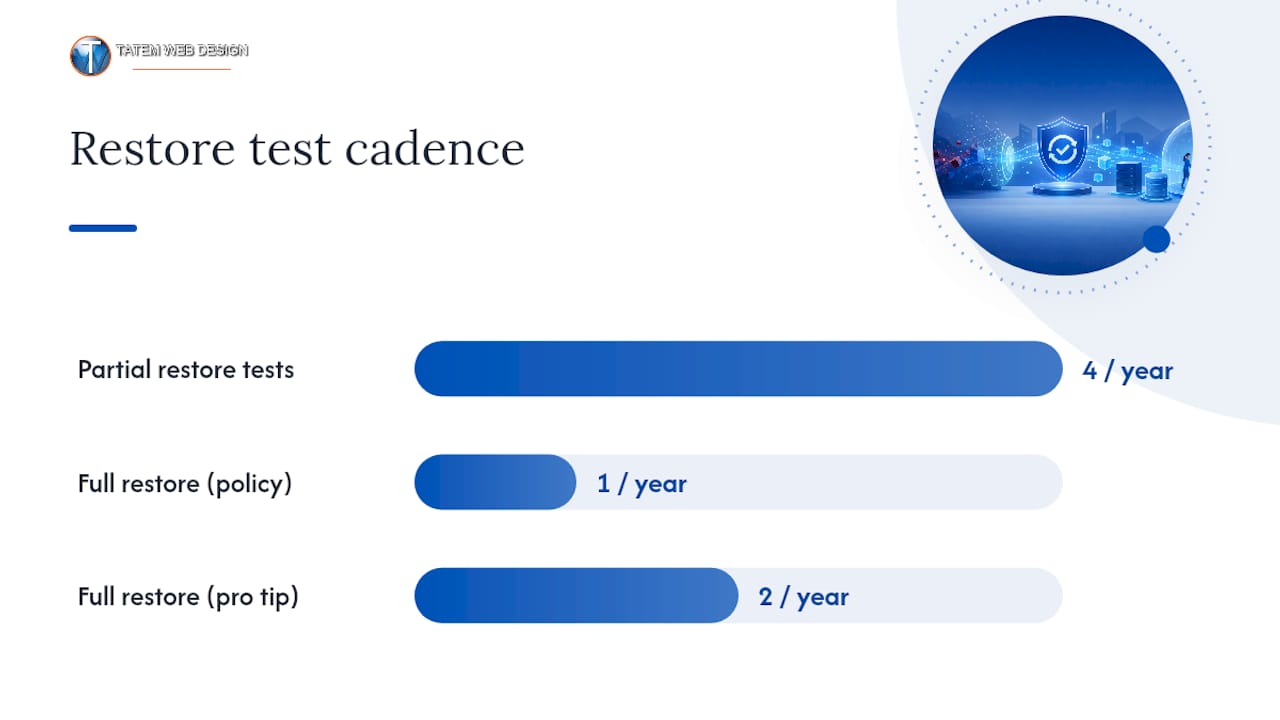
- Testing cadence: Run partial restore tests quarterly and a full restore test at least once a year.
On the question of paying a ransom: FBI guidance for business leaders notes that payment does not guarantee data recovery, and law enforcement generally advises against it. Report incidents to authorities and lean on tested backups instead of negotiating with attackers. Cyber insurance can offset recovery costs, but most policies require documented security controls already in place before an incident occurs.
Pro Tip: A backup job that reports “success” every night is not proof you can actually recover. Run a full restore test on a spare machine at least twice a year to confirm the data comes back clean.
How Do You Choose Affordable Ransomware Tools?
Budget-conscious SMBs don’t need to buy every category of tool at once. Focus spending on the five areas that carry the most risk: backup providers, endpoint protection, email filtering, MFA solutions, and, if needed, an MSSP or MDR contract.
Before signing with any vendor, run through this checklist:
- Does the backup provider isolate copies from your production environment, and will they run a live restore test with you before you commit?
- Does the endpoint tool update automatically without manual intervention on every machine?
- Does the email filter block attachments and links before they reach an inbox, not just flag them afterward?
- Can the MFA solution support hardware keys or authenticator apps, not just SMS?
- If evaluating an MSSP, will they show you a sample runbook with real restore and notification timelines?
Cost-saving tactics matter here too. Bundling backup, endpoint, and email protection through a single provider often costs less than piecing together separate tools. If your business runs an online store on a platform like BigCommerce, a dedicated backup plugin built for that platform can be more reliable and cheaper than a generic solution. Cloud-native backup features, already included in many hosting and productivity plans, frequently cover baseline needs without an added subscription.
How Tatem Web Design Helps SMBs Reduce Ransomware Risk
Experienced professionals have helped Florida small businesses close the exact gaps outlined above. A typical engagement starts small: enabling MFA across critical accounts, validating that backups actually restore, and setting up monthly monitoring so nobody is flying blind between check-ins.
For businesses in regulated industries, CMMC and HIPAA compliance consulting experience adds another layer of confidence, since those frameworks require many of the same controls ransomware defense demands: access restriction, encryption, and documented incident response. The overlap means compliance work and ransomware readiness often solve two problems at once.
Why Ransomware Is a Business Risk, Not Just an IT Problem
The businesses that recover fastest from ransomware aren’t the ones with the biggest security budgets. They’re the ones where leadership treated backups, MFA, and a written response plan as business continuity decisions, not IT chores to delegate and forget. A $40 MFA rollout and a tested backup routine cost far less than a week of downtime, yet plenty of owners still skip both until an incident forces the issue.
Governance beats gadgets here. Schedule your 30 and 90 day plan this quarter, and put someone’s name on it.
— Matt
Getting Started With Ransomware Protection and Compliance Support
Building the defenses covered here, tested backups, MFA, patched systems, a written response plan, takes time most SMB owners don’t have lying around. This service gap can be addressed by firms that combine AI-driven cybersecurity consulting with compliance experience, so the same engagement that hardens your defenses also documents them for auditors and insurers.

A typical engagement starts with a discovery conversation about what you’re protecting and why, followed by a prioritized roadmap you can act on immediately rather than a generic template. From there, you choose a fixed-scope project or an ongoing retainer, depending on whether you need a one-time cleanup or continuous monitoring. If you’re ready to turn the checklist in this guide into an actual plan for your business, explore Tatemweb’s AI-driven cybersecurity and compliance services or call 772-224-8118 to schedule a consultation.
Sources
These sources shaped the guidance above and are worth bookmarking directly:
- CISA — Back up your business data
- NIST SP 1300 — Cybersecurity Framework 2.0: Small Business Quick-Start Guide
FAQ
What Is the Best Protection Against Ransomware?
No single tool works alone. The strongest combination is automatic, isolated backups paired with phishing-resistant MFA, consistent patching, and a written incident-response plan tested at least annually, following the CISA Stop Ransomware guide.
What Are the Risks of Ransomware Attacks on Small Businesses?
Beyond the ransom demand itself, SMBs face extended downtime, permanent data loss, regulatory exposure if customer data leaks, and reputational damage that can outlast the technical recovery. Verizon’s 2025 DBIR shows smaller organizations are hit disproportionately hard relative to their size and resources.
What Are the 7 Stages of a Ransomware Attack?
Most security researchers describe ransomware progressing through initial access, execution, persistence, privilege escalation, lateral movement, data exfiltration, and finally encryption and extortion. Definitions vary slightly by source, but the pattern of quiet infiltration before visible damage stays consistent across incidents.
Which Industries Are Most Vulnerable to Cyber Attacks?
Healthcare, financial services, and professional services (legal, accounting) consistently rank among the most targeted sectors due to the sensitive data and payment access they hold. Small practices in these fields often lack dedicated IT security staff, which makes basic controls like MFA and backups especially high-value investments.
How Much Does Ransomware Protection Cost for a Small Business?
Costs vary widely depending on scope, but many of the highest-impact steps, MFA and patching, cost little beyond staff time. For a fully managed cybersecurity engagement, current pricing and service scope are available directly through Tatemweb’s cybersecurity services.
Recommended
Tatem Web Design
26+ YearsWeb Design & SEO Specialist · Tatem Web Design
Matt Tatem has been designing websites professionally since 1999, making Tatem Web Design one of Florida's longest-running web agencies. Based in Stuart, FL, he specializes in WordPress, local SEO, Shopify e-commerce, and cybersecurity consulting for small businesses.

CMMC Level 2 vs Level 1: Which One Applies to You?
CMMC Level 1 vs Level 2 compared: data types, 15 vs 110 requirements, self-assessment vs third-party audits, POA&M rules and how to pick your level.

Phishing Awareness Training for Small Business: A Practical Guide
How to build phishing awareness training for a small business: what to teach, how to run simulations, which numbers to track, and what to pair it with.

AI Content Pricing: What Florida Businesses Really Pay in 2026
What AI content costs in 2026: per-post ranges, tool subscriptions, editing time and agency retainers, plus how to budget and avoid hidden costs.